




What Is Access Control Security and How Does It Work?

Access Control Security is the practice of deciding who can enter a space, use a device, or view specific information. It connects identity with permission. At an office door, for example, an employee may tap a badge while a reader checks whether that badge is allowed to unlock the door. The same principle applies to digital accounts, where a system grants access to approved files or services. Small decisions can have real consequences.

How does it work? A person presents a credential, such as a badge, PIN, or account login. The system checks the credential and compares it with assigned permissions. Authentication helps confirm who is requesting access; authorization determines what that person may do. A staff member might enter the building but still be unable to open a secure records room. Some systems also record events, giving administrators a way to review entries, investigate unusual patterns, and update permissions when roles change.

Good access control depends on more than reliable readers and software. Permissions need regular review, credentials must be managed carefully, and backup procedures matter when a device fails. Logs can help, but they do not explain every event on their own. In practice, the edges are rarely tidy: a temporary worker may need limited access, while an old permission can remain unnoticed. No setup is perfect. Thoughtful design reduces avoidable gaps without making everyday work unnecessarily difficult. This guide explains the main components, common methods, and practical considerations behind Access Control Security.

What Is Access Control Security and How Does It Work?

What Access Control Security Means

Access control security is the set of rules and tools that decides who may enter a space, system, or record. It connects identity to permission: a badge opens a staff door, while an account may view only assigned files. Authentication checks who someone is; authorization defines what that person can do. Good controls follow least privilege and remove access when roles change. Simple idea. Hard to maintain.

Access is not just a locked door. Teams need accurate account lists, reliable sign-in checks, and logs showing when permissions were used. The 2024 Data Breach Investigations Report found that stolen credentials were an initial access method in 24% of breaches it analyzed. The 2024 Cost of a Data Breach Report put the average breach cost at $4.88 million, based on 604 organizations. These figures do not prove that access controls alone prevent breaches; they show why weak or outdated credentials deserve attention.

Tips: Review permissions when employees change roles, not only during annual audits. Test a real scenario: can a former project member still open a shared folder? Keep emergency access available, but record its use and review it afterward. Small gaps are easy to miss. That is worth admitting.

The Main Components of an Access Control System

An access control system is more than a locked door. It combines devices and rules to decide who may enter, where, and at what time. Each component has a distinct job, and a weakness in one can affect the whole setup.

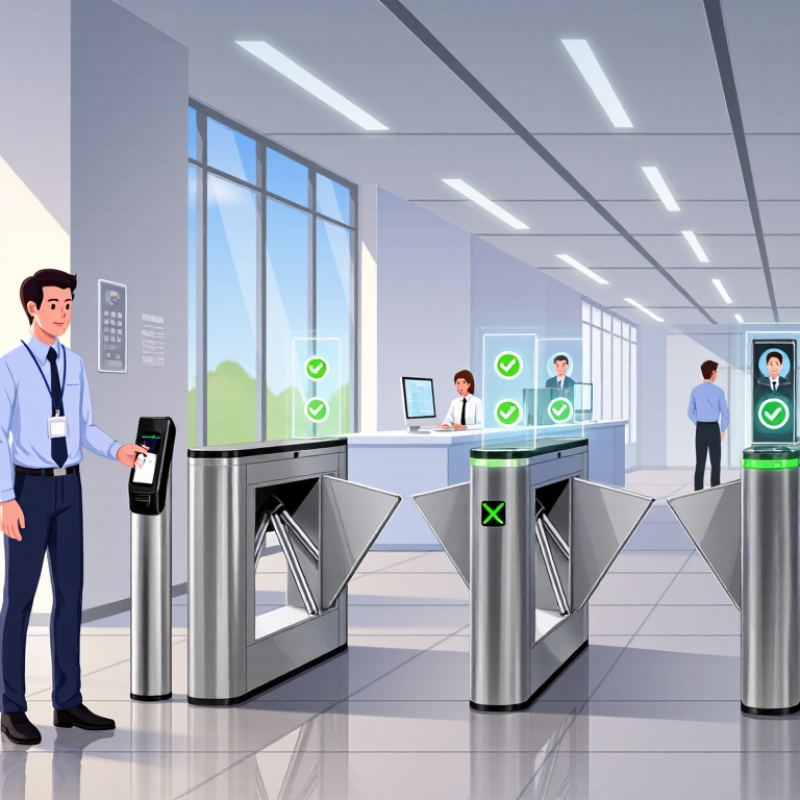
The credential is what a person presents, such as a card, PIN, or mobile pass. A reader checks it and sends the data to a controller. The controller compares that information with stored permissions. If access is approved, it signals an electric lock to release. The door opens. For example, a staff member might tap a card at a side entrance, while a visitor’s pass works only at reception during a set appointment window.

Management software lets authorized administrators assign access levels, change schedules, and review event logs. Logs can show which credential was used and when, helping teams investigate a door left open after closing. Door sensors can report whether it is shut, while request-to-exit devices allow people to leave without presenting a credential. Reliable power and network connections matter, too; backup power can keep key functions available during an outage. One detail is easy to miss: permissions need regular review as roles change. Even carefully designed systems can retain outdated access longer than intended.

What Is Access Control Security and How Does It Work?

The Main Components of an Access Control System

A typical access decision begins when a person presents a credential. A reader captures it, a controller checks the identity and applicable permissions, and the system grants or denies entry through the door hardware. The event is then recorded. The numbers show the order of these steps, not performance measurements.

How Access Requests Are Evaluated and Granted

An access request usually starts when a person or device asks to use a specific resource, such as a payroll folder or a shared office printer. Authentication checks the claimed identity; authorization decides what that identity may do. A password alone is not enough. Systems may also check a verified device, location, time, and recent sign-in activity.

A policy compares those details with the requested action. An employee might view a project file but need separate approval to edit it. Access is granted when the request meets the rules, and denied when required conditions are missing. Some requests go to a manager or data owner for review. Clear prompts help reviewers check the person’s role, the business need, and the requested duration—not just click approve.

Good decisions are narrow and traceable. Temporary access should expire automatically, while logs record who requested it, who approved it, and what was allowed. These records help teams investigate mistakes and spot unusual patterns. Still, rules can be too broad, and an approval may reflect habit rather than real need. Regular reviews catch some of that drift, though they require time and honest attention.

What Is Access Control Security and How Does It Work? — How Access Requests Are Evaluated and Granted

Stage What Is Evaluated Example Typical Result or Safeguard
1. Request The person, resource, requested action, and business reason are identified. A staff member requests read access to a project folder for an assigned task. The request is recorded with a specific resource and permission, rather than broad, unspecified access.
2. Authentication The system verifies that the requester is who they claim to be. The requester signs in with an account and completes multifactor authentication when required. Access evaluation proceeds only after successful identity verification. Failed or incomplete authentication blocks the request.
3. Policy evaluation Rules may consider the user’s role, resource sensitivity, requested action, device, location, and other approved attributes. A policy allows project-team members to view their project files but reserves editing for designated roles. Role-based access control (RBAC) uses role assignments; attribute-based access control (ABAC) evaluates attributes and conditions. Systems may use either or combine them.
4. Approval, if required Policy determines whether an authorized manager or resource owner must approve the request. A request for sensitive records is routed to the responsible data owner for review. Approval does not replace policy checks; the requester must still meet applicable identity and access requirements.
5. Decision The system compares the request with permissions and conditions, including any separation-of-duties or risk rules. A user with the required role requests an action permitted by policy; another user without that role requests the same action. Permit: grant only the allowed action. Deny: block requests that fail policy checks; many systems default to denying unapproved access.
6. Access granted The scope and duration of the permission are set. A user receives read-only access to one folder for the period needed to complete a task. Least privilege limits access to the minimum resources and actions needed. Time-limited or just-in-time access can reduce standing permissions.
7. Logging and review Grant decisions and relevant access activity are recorded and reviewed. An audit log records who requested access, what was granted, the decision, and when it occurred. Logs support monitoring and investigation. Periodic access reviews help confirm that permissions remain appropriate.
8. Revocation Permissions are reconsidered when a role changes, a task ends, an account is disabled, or access is no longer justified. Temporary project access expires at its set end date or is removed when the user leaves the project. Removing unneeded permissions reduces the chance of inappropriate or unintended access.

The examples are illustrative. Exact access policies, approval steps, and authentication requirements vary by system and the sensitivity of the resource.

Common Access Control Models and Policies

What Is Access Control Security and How Does It Work?

Common Access Control Models and Policies

Access control decides who can enter a system, view a file, or change a setting. Common models include role-based access control (RBAC), attribute-based access control (ABAC), discretionary access control (DAC), and mandatory access control (MAC). RBAC grants permissions by job role; ABAC checks attributes such as location, device, and time. DAC lets resource owners assign access, while MAC applies centrally defined classifications. Each model fits different needs. A small office may manage roles easily, while a hospital may need tighter, context-aware rules.

Policies turn these models into daily decisions: grant only necessary access, require stronger checks for sensitive actions, and remove permissions when duties change. The 2024 Data Breach Investigations Report found that 68% of breaches involved a non-malicious human element. Access controls cannot prevent every mistake, but clear rules and regular reviews can limit its impact. The 2024 Cost of a Data Breach Report put the global average breach cost at $4.88 million. Stale accounts can become more than paperwork. Exceptions happen.

Tips: Review access lists quarterly, and check them after role changes. Test a new policy with a few users before applying it widely. Keep an emergency access path, but log its use and review it promptly. The awkward part: exceptions tend to linger unless someone owns them.

Where Access Control Is Used and Why It Matters

Access control security is used wherever people, devices, or information need different levels of access. In offices, staff badges may open shared entrances, while only approved employees can enter a records room. Schools use permissions to limit access to classrooms and equipment areas. Clinics protect medication storage and private patient systems. Warehouses often separate visitor routes from loading zones. Digital services apply the same idea to accounts, files, and administrative tools.

It matters because one open door or over-permissioned account can expose more than intended. Clear access rules help protect people, property, and sensitive information. They also make everyday work smoother: a visitor can check in at reception without receiving access to every floor. Access logs can help teams review unusual activity, but logs need regular attention. Old permissions are easy to overlook. No system is perfect, either; a lost badge or poorly configured account can still create risk. Review access after role changes, and remove permissions that are no longer needed.

Tips: Give each person only the access required for their current tasks. Test entry procedures with real staff, not just on paper. Keep a simple process for reporting lost credentials. Recheck high-risk areas regularly. Small gaps matter.

Cart Summary

Subtotal: $0